- Log in to TrueTMS on the web application. On the menu on the left of your home screen under the General section, select ‘Loads’ (a) and then ‘New Load’ (b)

- Click on the Customer block. A dropdown box will appear with all your pre-populated customers listed. The last option in this box is 'Add New Customer'. Simply click on 'Add New Customer' and you will be prompted to fill in only the most necessary details of the customer in order to quickly create the load.
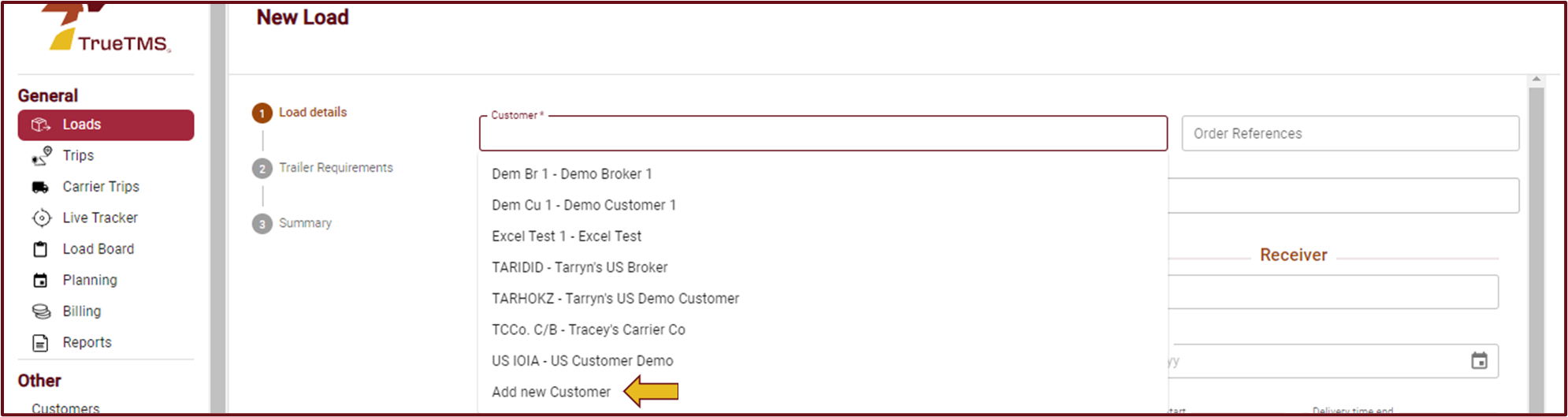
- You are able to create a new shipper and a new receiver using this method.
- The system will automatically input the newly added Customer / Shipper / Receiver, together with their business code so you are able to conveniently continue creating the load.
You may want to make a note to go back and edit this customer to include all their information at a later stage