- To begin, navigate to the General section in the menu on the left. Then, select 'Loads' (a). Click on the load number associated with the load you wish to invoice. Next, go to the top tab menu and select 'Invoicing' (b). To finalize the invoice, it is important to ensure that all relevant charges, including accessorial charges and reimbursements for your driver, have been added and are correct (c).
-
Please note that once a charge has been added to a load, the system will automatically generate an invoice in the background.
-
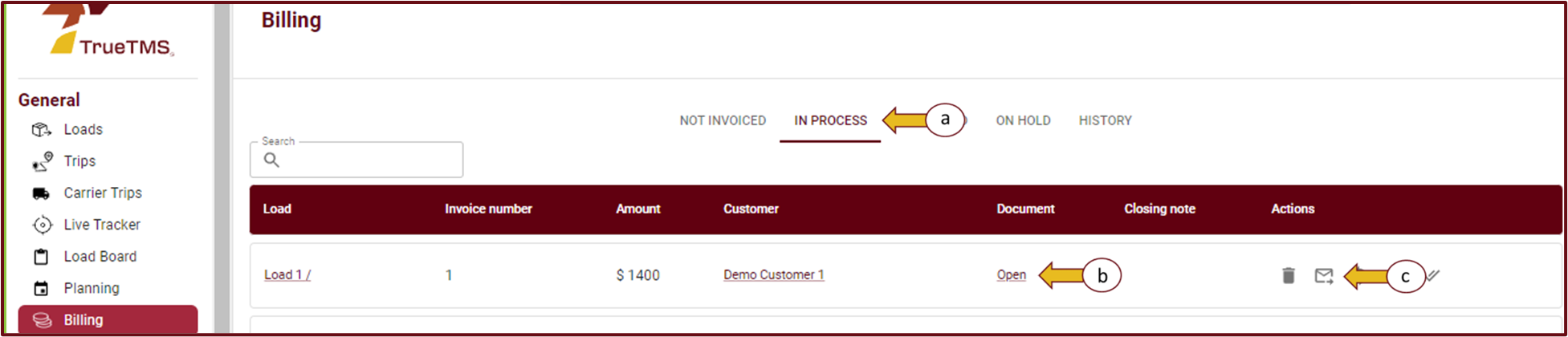
Once you have verified that all the essential charges and Accessorial charges (if relevant) have been added, proceed to the 'Billing' option located in the left menu under the General section.
- Now, in the top tab menu, choose 'In Process' (a) and locate the specific load you are invoicing. Click 'Open' to access the invoice (b). From there, you can easily send the invoice by selecting the envelope icon (c).
- Once you have selected the send invoice option, a pop-up will appear, conveniently displaying the email address to which this invoice will be sent. All you need to do is click 'send' to successfully complete the process.


